Notification
Go to Home All Tools Compare Glossary Blog Contact

DNS Leak Test

Test your connection for DNS leaks while using a VPN or proxy. Identify DNS resolvers, compare them with your expected VPN path, and check for unexpected DNS exposure.

Diagnostic Controls

Configure query depth and expected network path

Ready

DNS Leak Test Result

No Leak Indication

No DNS Leak Indication

All observed DNS queries were handled by a single consistent DNS resolver network.

Resolvers Detected 0
Resolver Networks 0
Queries Observed 0 / 0
Primary Provider --
Country --
Confidence High

VPN OFF vs ON Local Comparison

Side-by-Side Path Verification
Test A: VPN OFF
Provider: Not Set
Country: Not Set
Resolvers: --
Test B: VPN ON
Provider: Not Set
Country: Not Set
Resolvers: --
Run a test with VPN OFF, click "Set Current as Baseline", then connect your VPN and run again to compare.

DNS Resolvers Detected

0 Observed
Resolver IP Provider / ASN Country Queries
No DNS resolver probes executed yet. Click "START DNS LEAK TEST".

Resolver Distribution

Chart will generate automatically after probe completion.

DNS Probe Timeline

0 Probes
Timeline will populate during test run.

Local Session History

No previous session logs stored locally.

Which Privacy Test Should I Run?

EasyToolio provides three distinct, complementary browser diagnostic tools to inspect every layer of your connection identity.

WebRTC Leak Test

Focus: Browser P2P IP Exposure
Evaluates whether W3C RTCPeerConnection and STUN candidate binding requests bypass your VPN to leak ISP-assigned public or private IPs.

Run WebRTC Test

IP & VPN Leak Test

Focus: Visible Connection Identity
Synthesizes HTTP public IP, dual-stack IPv4/IPv6 exposure, and expected VPN exit gateway consistency into a unified privacy verdict.

Run IP & VPN Test

DNS Leak Test (Active)

Focus: Recursive Resolver Exposure
Tracks which recursive DNS servers process your domain lookups using authoritative single-use subdomain probes.

Currently Viewing

Context-Aware DNS Leak Troubleshooting

Common Causes of DNS Leaks

  • Unprotected VPN Client: VPN app lacks built-in DNS leak protection or kill switch.
  • Windows Smart Multi-Homed Name Resolution: Windows sends parallel DNS queries across all network interfaces.
  • Browser DNS-over-HTTPS (DoH): Browser routes DNS requests through independent DoH resolvers outside the VPN tunnel.
  • Split Tunneling Misconfiguration: DNS queries route outside the VPN tunnel while web traffic stays encrypted.

Recommended Remediation Steps

  • Enable VPN DNS Leak Protection: Turn on "Force VPN DNS" inside your VPN app settings.
  • Configure Secure Static DNS: Set custom DNS resolvers (such as 1.1.1.1 or 9.9.9.9) on your OS network adapter.
  • Align Browser DoH: Configure browser DNS-over-HTTPS settings to match your VPN or disable DoH overrides.
  • Disable Smart Name Resolution: Turn off `Smart Multi-Homed Name Resolution` in Windows Group Policy.
Privacy Advisor

AI DNS Security & Leak Advisor

Ask AI
Education

Understanding DNS Resolution, Encrypted DNS & VPN Privacy

01

What is a DNS Leak?

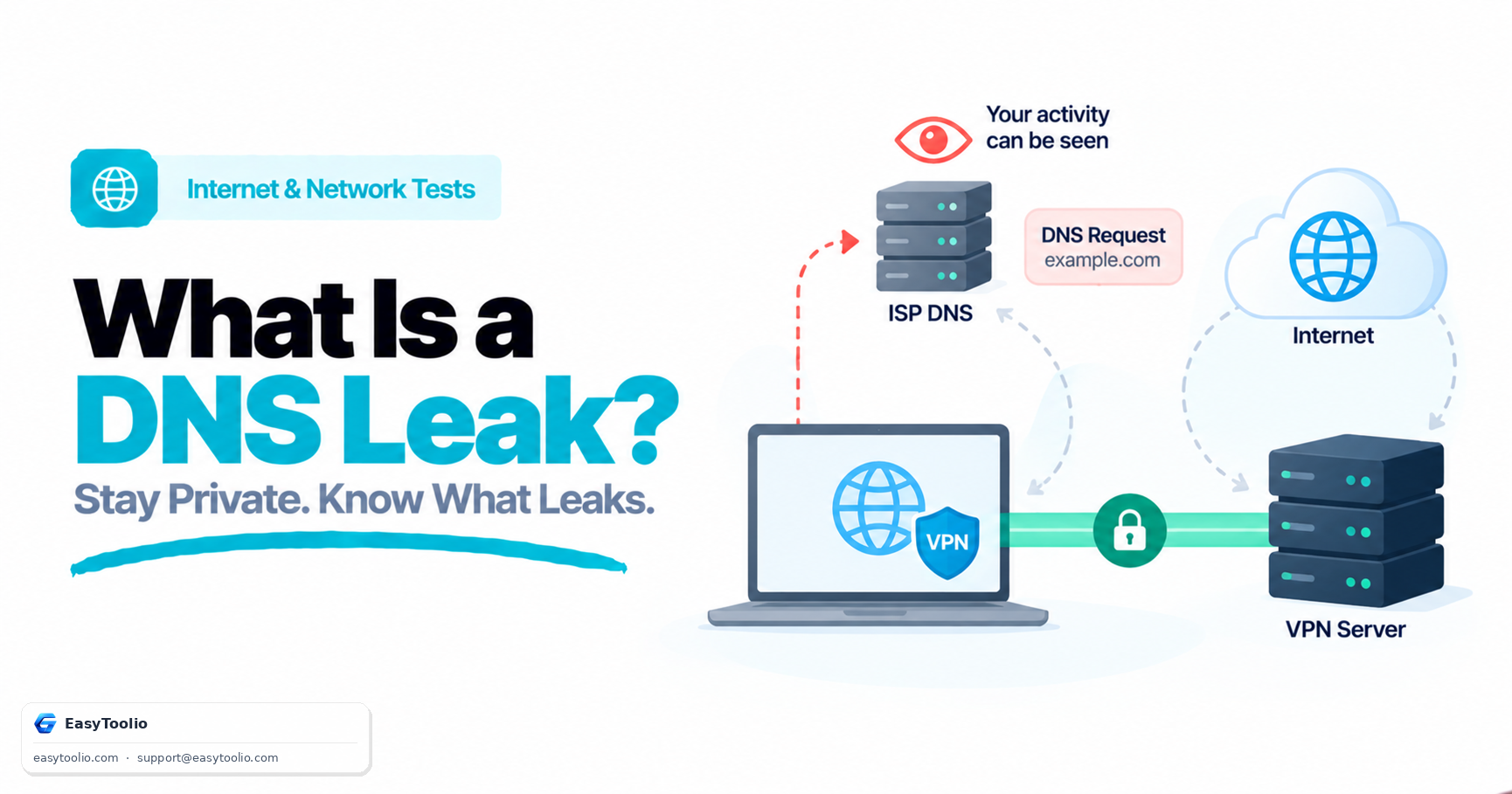
A DNS leak happens when internet domain requests bypass your VPN tunnel and are sent directly to your ISP or third-party recursive DNS servers.

02

Recursive Resolvers vs. Authoritative Servers

Recursive resolvers look up IP addresses for domain names on your behalf, while authoritative servers maintain the official domain records.

03

DNS-over-HTTPS (DoH) & DNS-over-TLS (DoT)

DoH and DoT encrypt DNS queries between your browser/system and DNS provider, guarding against local Wi-Fi eavesdropping and ISP hijacking.

04

How Authoritative Probing Detects Leaks

By generating unique single-use subdomains, our diagnostic server inspects which recursive resolver IP address actually fetches the DNS record.

Good to know

Questions, answered

Quick answers about how this tool works.

A DNS leak occurs when your internet domain resolution requests (DNS queries) bypass your secure VPN tunnel and are handled by unauthorized recursive DNS servers, such as your local ISP.

Connect to your VPN and start this test. The tool triggers unique DNS lookups to an authoritative test server and identifies which recursive resolvers process the queries.

The test generates unpredictable, single-use subdomains. When your browser attempts resolution, the authoritative nameserver logs which recursive resolver queried it.

Yes. DNS leaks can happen if your VPN software lacks built-in DNS leak protection, if split tunneling is misconfigured, or if your OS overrides DNS settings.

You should see DNS resolvers belonging to your VPN provider or designated secure DNS service. You should NOT see your local ISP's DNS servers.

DNS-over-HTTPS encrypts DNS queries via HTTPS protocols (port 443), preventing local network eavesdropping and ISP DNS tampering.

DoH encrypts DNS traffic between your browser and the DoH provider, but if that provider is outside your VPN tunnel, it may still expose your query activity.

If your ISP DNS appears while your VPN is connected, your VPN is failing to route DNS requests through the encrypted tunnel, indicating an active DNS leak.

Multiple resolvers can appear if your OS or browser uses fallback DNS servers, dual-stack IPv4/IPv6 resolvers, or load-balanced DNS pools.

A DNS leak reveals which DNS server resolves your web requests. A WebRTC leak reveals your real public or private IP address via browser P2P connection APIs.

Enable DNS Leak Protection in your VPN client, force your OS to use static secure DNS servers (e.g. Cloudflare 1.1.1.1), or disable smart multi-homed resolution in Windows.

No. Test tokens expire in 180 seconds, and no permanent DNS query logs or IP history are stored.

Popular Tools on EasyToolio

Swipe

What do you need to work out next?

Search 205+ free tools by name, or pick a category below. Every one runs instantly in your browser — no signup, nothing to install.