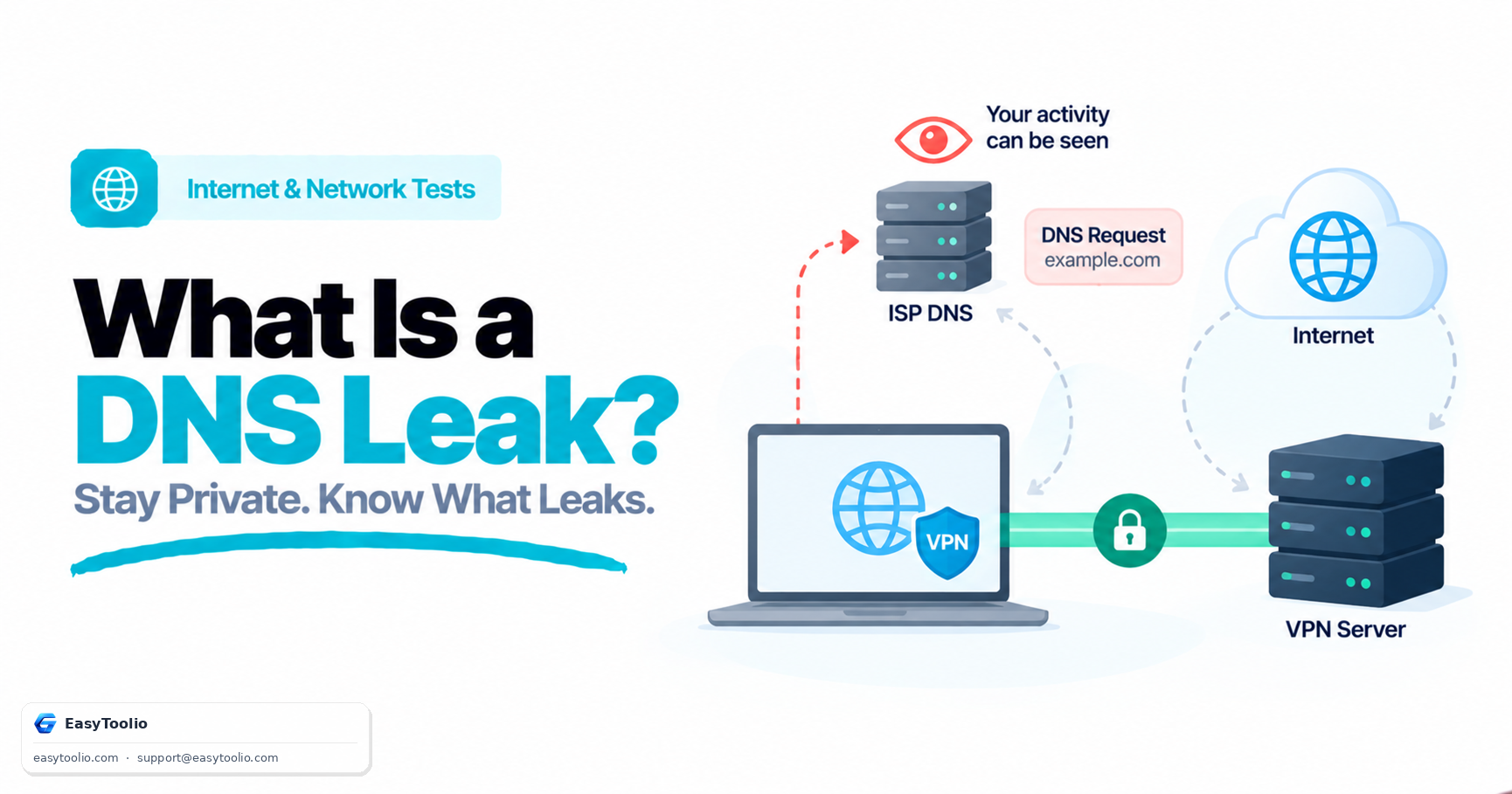
When you connect to a Virtual Private Network (VPN), your internet traffic is encrypted and routed through a secure gateway server. However, if your operating system continues to send domain name lookup queries to your default ISP DNS server instead of the VPN's secure DNS, a DNS Leak occurs.
Direct Answer: A DNS Leak happens when DNS lookup requests ("What is the IP for example.com?") bypass an active encrypted VPN tunnel and are sent to unencrypted third-party or ISP DNS servers. As a result, even though your actual data payload remains encrypted, your ISP (or whoever operates that DNS resolver) can log every domain name you visit, undermining a core reason many people use a VPN in the first place.
1. How a DNS Leak Test Works
DNS leak testing tools evaluate your network configuration using dynamic, unique subdomain lookup queries so each test run is distinguishable from every other:
1. Client Browser ──► Requests random unique hostname (e.g., a randomly generated test subdomain)
2. Authoritative Nameserver ──► Captures the IP address of the Recursive Resolver that made the request
3. Result Comparison ──► If the resolver IP/ASN belongs to your ISP (and not your VPN provider), a DNS LEAK is flagged
A clean result shows only resolver IPs belonging to your VPN provider's network (or a third-party DNS service you deliberately configured, such as a privacy-focused public resolver). Seeing resolver IPs that trace back to your home ISP's autonomous system while connected to a VPN is the signature of a leak.
2. Common Causes of DNS Leaks
- Windows Smart Multi-Homed Name Resolution (SMHNR): Windows 10/11 can send DNS queries across all available network interfaces simultaneously to speed up resolution, sometimes accepting whichever response returns first — which may be the local ISP resolver rather than the VPN's.
- IPv6 Fallback Leaks: If your VPN tunnels only IPv4 traffic (a common gap in older or misconfigured VPN clients), IPv6 DNS requests can fall back to your ISP's unencrypted IPv6 resolver even while IPv4 traffic is fully protected.
- Manual Static DNS Overrides: Manually configured static DNS addresses in network adapter or router settings can override the DNS servers your VPN client tries to push, especially on router-level VPN setups.
- Split-Tunnel VPN Configurations: Some VPN apps allow specific apps or traffic types to bypass the tunnel for performance reasons; if DNS traffic is inadvertently included in the excluded category, it leaks by design rather than by bug.
3. How to Fix DNS Leaks
- Enable "Block Outside DNS" (or equivalent) in Your VPN Client: Many VPN clients include an explicit DNS leak protection setting that blocks any DNS traffic not routed through the VPN's own resolver at the OS firewall level. Check your client's advanced or network settings.
- Configure Encrypted DNS (DoH / DoT): Enabling DNS-over-HTTPS or DNS-over-TLS in your browser or OS encrypts DNS requests in transit, which prevents a passive observer (though not necessarily the resolver operator itself) from reading the plaintext query — useful as defense-in-depth alongside, not instead of, a leak-protected VPN.
- Disable Smart Multi-Homed Name Resolution in Windows: Disable SMHNR via Group Policy Editor (
gpedit.msc→ Computer Configuration → Administrative Templates → Network → DNS Client → "Turn off smart multi-homed name resolution"), available on Windows Pro/Enterprise editions. - Manually Set DNS on the VPN Adapter Only: If your VPN doesn't manage DNS automatically, manually point the VPN network adapter's DNS to your VPN provider's resolver (or a resolver you trust) rather than leaving it on "obtain automatically," which may default back to your router/ISP DNS.
Technical Testing Limitation
A DNS leak test identifies the IP address (and typically the owning network/ASN) of the upstream recursive resolver that executes DNS queries during the test. It cannot inspect local OS hosts file overrides, internal router forwarding rules, or DNS-over-HTTPS traffic that a passive test page has no visibility into — so a passing result is a strong signal, not an absolute guarantee, of full DNS privacy.
Audit your DNS routing for leaks using our DNS Leak Test, check VPN IP integrity with the IP/VPN Leak Test, test browser WebRTC leaks via the WebRTC Leak Test, and query raw records in DNS Lookup.
4. Transparent DNS Proxying: A Leak Your VPN Settings Can't Prevent
Beyond the causes already covered, some ISPs run transparent DNS proxying (sometimes called DNS hijacking or interception) at the network level: regardless of which DNS server you manually configure on your device, the ISP's router or upstream infrastructure intercepts outbound port 53 (or DNS-over-TLS/HTTPS) traffic and silently redirects it to the ISP's own resolver. This is distinct from the OS-level causes above because it happens outside your device entirely, so no amount of local DNS configuration alone will fix it if the VPN tunnel doesn't also encapsulate that traffic.
This is precisely why "block outside DNS" and similar VPN client features work at the firewall/routing level rather than just changing a DNS setting — they prevent any DNS packet from leaving the device outside the encrypted tunnel in the first place, which defeats transparent proxying regardless of where it happens upstream. If you suspect transparent proxying (for example, a DNS leak test keeps showing your ISP's resolver even after manually setting a different DNS server outside of a VPN), routing all traffic including DNS through an encrypted VPN tunnel is the most reliable fix, since it removes the ISP's ability to see or intercept the plaintext query at all.
5. Frequently Asked Questions (FAQs)
Can your ISP see what content you view if you have a DNS leak?
If you visit HTTPS websites, a DNS leak allows your ISP to see which domain name you visited (e.g., a site's root domain), but generally not the specific page path or the actual encrypted content of the page, since that part of the connection is still protected by HTTPS.
Does a DNS leak mean my VPN is not working at all?
Not necessarily. A DNS leak means DNS queries are escaping the tunnel while the rest of your traffic (the actual data payload) may still be correctly encrypted and routed through the VPN. It is a partial, but still significant, privacy failure.
Why did my DNS leak test show a resolver I don't recognize?
Some VPN providers route DNS queries through third-party resolvers (rather than hosting their own), and some public DNS-over-HTTPS services anycast their infrastructure across many regions, so the resolver IP shown may belong to a company you didn't directly choose. Check the resolver's owning organization against your VPN provider's documented DNS setup before assuming it's a leak.
Do I still need to test for DNS leaks if I use encrypted DNS (DoH)?
Yes. Encrypted DNS protects the query in transit from local eavesdroppers, but it doesn't guarantee the query is being routed through your VPN's resolver rather than a different (still encrypted) third-party resolver outside the tunnel — which is still a leak from a "who can see my browsing" standpoint, even if it isn't plaintext.
References: IETF RFC 8484 (DNS Queries over HTTPS), IETF RFC 7858 (DNS over TLS).