json.loads() throws. The response looked fine in the logs. This is a specific and very common category of bug, and it is worth knowing that model-generated JSON fails in ways that hand-written and machine-generated JSON does not — which means the usual debugging instincts send you looking in the wrong place.
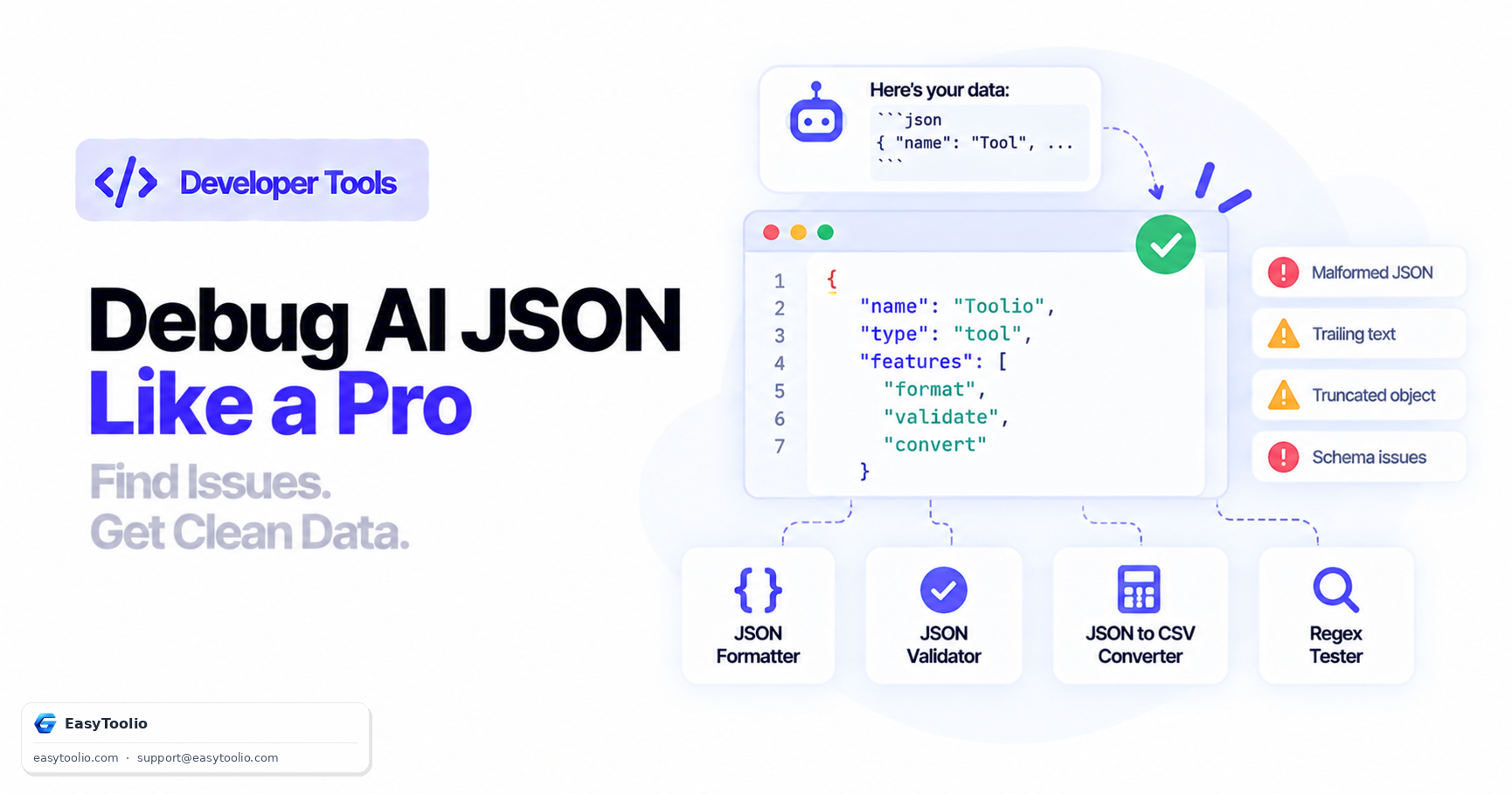
Direct Answer: Model-generated JSON fails in a small number of recognisable ways: it arrives wrapped in a markdown code fence, it has explanatory prose before or after the object, it was cut off mid-object because generation hit the output token limit, the model returned a refusal instead of content, it uses JSON-invalid syntax it learned from Python or JavaScript (single quotes, trailing commas, None, NaN, unquoted keys), or it is perfectly valid JSON containing wrong values. The diagnostic order that saves the most time is: check whether generation finished (finish_reason), check for a refusal, then strip any wrapper, then format and validate the remainder, and only then compare against your schema. Strict-mode Structured Outputs eliminates most of these categories at the source and is the real fix — but it does not cover truncation or refusals, so those checks stay.
Step 1: work out which kind of failure you have
Before touching the JSON, classify the problem. These need completely different fixes:
| Symptom | Actual cause | Fix |
|---|---|---|
| Parse error at position 0 | Markdown fence or prose preamble | Strip the wrapper; better, use strict mode |
| Parse error near the end, unterminated | Truncation at the token limit | Check finish_reason; raise max_tokens |
content is null or empty |
The model refused | Read the refusal field |
| Parse error mid-document | Python/JS-style syntax | Use strict mode |
| Parses fine, code still breaks | Missing keys or wrong types | Validate against your schema |
| Parses and validates, output still wrong | Schema-valid but incorrect content | A prompt problem, not a JSON problem |
The last row is the one that costs teams the most time, because every tool in the chain reports success.
Step 2: check whether generation actually finished
Do this first. It is one field and it explains a large share of unparseable output.
choice = response.choices[0]

if choice.finish_reason == "length":
    # Generation hit the token ceiling mid-object. The JSON is not
    # malformed — it is incomplete. No parser can rescue this.
    raise TruncatedResponse(choice.message.content[-200:])

if choice.message.refusal:
    # The model declined. content will be null.
    raise ModelRefusal(choice.message.refusal)
A truncated response is not a formatting bug and no amount of cleanup will fix it. Either raise your output token limit, or ask for less in one response. GPT-6 Astra caps output at 128,000 tokens, but your own max_tokens is usually the binding constraint, and a large array of records will hit it long before the model's ceiling.
Truncation is also easy to misdiagnose because the visible portion looks correct. Log the last 200 characters, not the first — an object that ends with "descripti tells you immediately what happened.
Step 3: format it before you try to read it
A minified 40KB object with one structural error in it is unreadable, and squinting at it in a terminal is not debugging. Paste it into our JSON Formatter and you get indented, hierarchical output where a missing brace or a wrongly nested array is visible rather than inferred.
Then run it through the JSON Validator, which reports the specific parse error and its position instead of a generic exception message. Knowing the failure is at line 340, character 12 turns a hunt into a lookup.
This two-step is worth doing even when you are confident you know the cause. It takes fifteen seconds and it regularly contradicts the hypothesis.
The syntax mistakes models actually make
When not constrained by strict mode, models produce JSON that reflects their training data — which is full of Python and JavaScript:
{ 'name': 'value' }              // single quotes — invalid JSON
{ "a": 1, "b": 2, }              // trailing comma — invalid JSON
{ "value": None }                // Python None — invalid JSON
{ "score": NaN }                 // NaN — invalid JSON
{ name: "value" }                // unquoted key — invalid JSON
{ "n": 1_000_000 }               // numeric separator — invalid JSON
// a comment                     // comments — invalid JSON
All of these are valid in some language. None are valid JSON. You can write cleanup passes for each, and people do, but every such pass is a guess about intent and a source of silent corruption. The correct fix is upstream.
Step 4: extract the JSON safely if you must
If you cannot use strict mode — some providers or endpoints do not support it — you will be extracting an object from surrounding text. Two approaches, one of which is a trap.
The naive regular expression is a trap:
# Fails on any nested object, because .*? stops at the first }
match = re.search(r"\{.*?\}", text, re.DOTALL)
Brace matching is what you want:
def extract_json(text: str) -> str:
    # Strip a markdown fence if present
    fence = re.search(r"```(?:json)?\s*(.*?)```", text, re.DOTALL)
    if fence:
        text = fence.group(1)

    start = text.find("{")
    if start == -1:
        raise ValueError("no JSON object found")

    depth, in_string, escaped = 0, False, False
    for i, ch in enumerate(text[start:], start):
        if escaped:
            escaped = False
            continue
        if ch == "\\":
            escaped = True
        elif ch == '"':
            in_string = not in_string
        elif not in_string:
            if ch == "{":
                depth += 1
            elif ch == "}":
                depth -= 1
                if depth == 0:
                    return text[start:i + 1]

    raise ValueError("unterminated JSON object — likely truncated")
Note that this correctly tracks string state, so a } inside a string value does not end the object early — the bug that breaks most homegrown extractors. If you are writing or adjusting the fence-stripping pattern, test it against real model output in our Regex Tester rather than against the output you expect; models vary the fence label (```json, ```JSON, sometimes none at all) more than you would guess.
Step 5: the real fix — strict-mode Structured Outputs
Everything above is remediation. Strict mode is prevention, and it removes whole categories of this bug.
response = client.chat.completions.create(
    model="gpt-6-astra",
    messages=messages,
    response_format={
        "type": "json_schema",
        "json_schema": {
            "name": "extraction",
            "schema": {
                "type": "object",
                "properties": {
                    "title":    {"type": "string"},
                    "priority": {"type": "string", "enum": ["low", "high"]},
                    "tags":     {"type": "array", "items": {"type": "string"}},
                },
                "required": ["title", "priority", "tags"],
                "additionalProperties": False,
            },
            "strict": True,
        },
    },
)
OpenAI's guide states that with strict: true the model "will always generate responses that adhere to your supplied JSON Schema" — no missing required keys, no invented enum values, no markdown fence, no prose preamble.
What strict mode does not cover, and you must still handle:
- Truncation. Constraining what the model may emit does not guarantee it finishes. Check
finish_reason. - Refusals. A safety refusal returns a
refusalfield and null content, regardless of your schema. - Correct-shaped, wrong-content output. OpenAI's own guidance is that "Structured Outputs can still contain mistakes." A
priorityof"low"on an urgent ticket is schema-perfect and operationally wrong. - Unsupported schema keywords. Strict mode supports much of JSON Schema but not all of it, so validate your schema is accepted rather than assuming.
Point three is worth dwelling on. Schema validation is a syntax check. It tells you the shape is right and says nothing about whether the values are. If wrong values have consequences, you need business-logic validation on top — range checks, cross-field consistency, sanity bounds — not just a schema.
Step 6: once it parses, make it readable
Debugging a data problem rather than a format problem is easier in a table than in nested JSON. If the model returned an array of records, our JSON to CSV Converter will flatten it into rows you can scan in a spreadsheet — which is usually how you spot that field 3 is empty on 40% of records, or that a date is in two different formats.
The checklist
finish_reason == "length"? → truncated. Raise the limit or reduce the request.message.refusalpopulated? → a refusal, not a bug.- Format it in the JSON Formatter so structure is visible.
- Validate it in the JSON Validator for the exact error position.
- Strip markdown fences and prose only if you cannot use strict mode.
- Compare against your schema for missing keys and wrong types.
- Validate the values, not just the shape.
- Then go fix it properly with strict mode so step 5 stops being necessary.
If your JSON problem turns out not to be model-specific at all, our general guides cover the rest: How to Fix Invalid JSON Syntax Errors and JSON Formatter vs Validator.
Frequently Asked Questions (FAQs)
Why does the model wrap JSON in a markdown code fence?
Because most JSON in its training data appeared inside code fences in documentation and forum posts, so producing one is the statistically natural continuation. Asking it not to helps inconsistently; strict mode removes the behaviour entirely.
My JSON is cut off halfway. Is the model broken?
No — generation hit a token ceiling. Check finish_reason; if it is length, raise max_tokens or ask for fewer records per call. No parser can recover a truncated object.
Does Structured Outputs guarantee my JSON is correct?
It guarantees the JSON conforms to your schema. It does not guarantee the values are right. OpenAI's own documentation notes that structured outputs can still contain mistakes, so validate the content separately when it matters.
Should I write a cleanup function for single quotes and trailing commas?
Only as a fallback for providers where strict mode is unavailable. Each cleanup rule is a guess about intent and can silently corrupt data — for example, "fixing" a trailing comma inside a string value.
Why does content come back as null?
Most often a refusal, with the explanation in the refusal field. Reading only message.content produces a confusing null-reference error rather than a clear one.
How do I tell whether the problem is my schema or the model?
Validate your request payload before blaming the response. A schema using keywords strict mode does not support will produce confusing behaviour rather than a clean error, so check your schema is accepted first.
The short version
Check finish_reason and refusal before you look at the JSON at all — those two fields explain most cases. Then format and validate rather than reading minified output. Then check values, not just shape.
And fix it at the source: strict-mode Structured Outputs removes fences, prose, invalid syntax and missing keys in one change. What it leaves you responsible for is truncation, refusals, and whether the answer is actually right. If you are building against GPT-6 Astra specifically, GPT-6 Astra for Developers covers the surrounding configuration.
Sources: OpenAI structured outputs guide (strict-mode guarantee, refusal and truncation failure modes, partial JSON Schema support, the "can still contain mistakes" caveat); OpenAI API model reference for gpt-6-astra (128,000-token output cap). Code samples are illustrative.