A script that hammers an API in a tight retry loop after getting rejected isn't being resilient — it's making the problem worse for itself and everyone else sharing that API. A 429 Too Many Requests response is not an outage or a bug to route around; it is the server giving explicit, structured instructions for how fast you're allowed to go, and ignoring those instructions is what gets IPs and API keys banned outright.
Every API that serves more than a handful of clients has to protect itself from being overwhelmed, whether by a runaway script, a traffic spike, or a client on a free tier trying to use paid-tier volume. Rate limiting is how that protection is implemented, and understanding its mechanics turns a mysterious "why do I keep getting blocked" problem into a solvable engineering task.
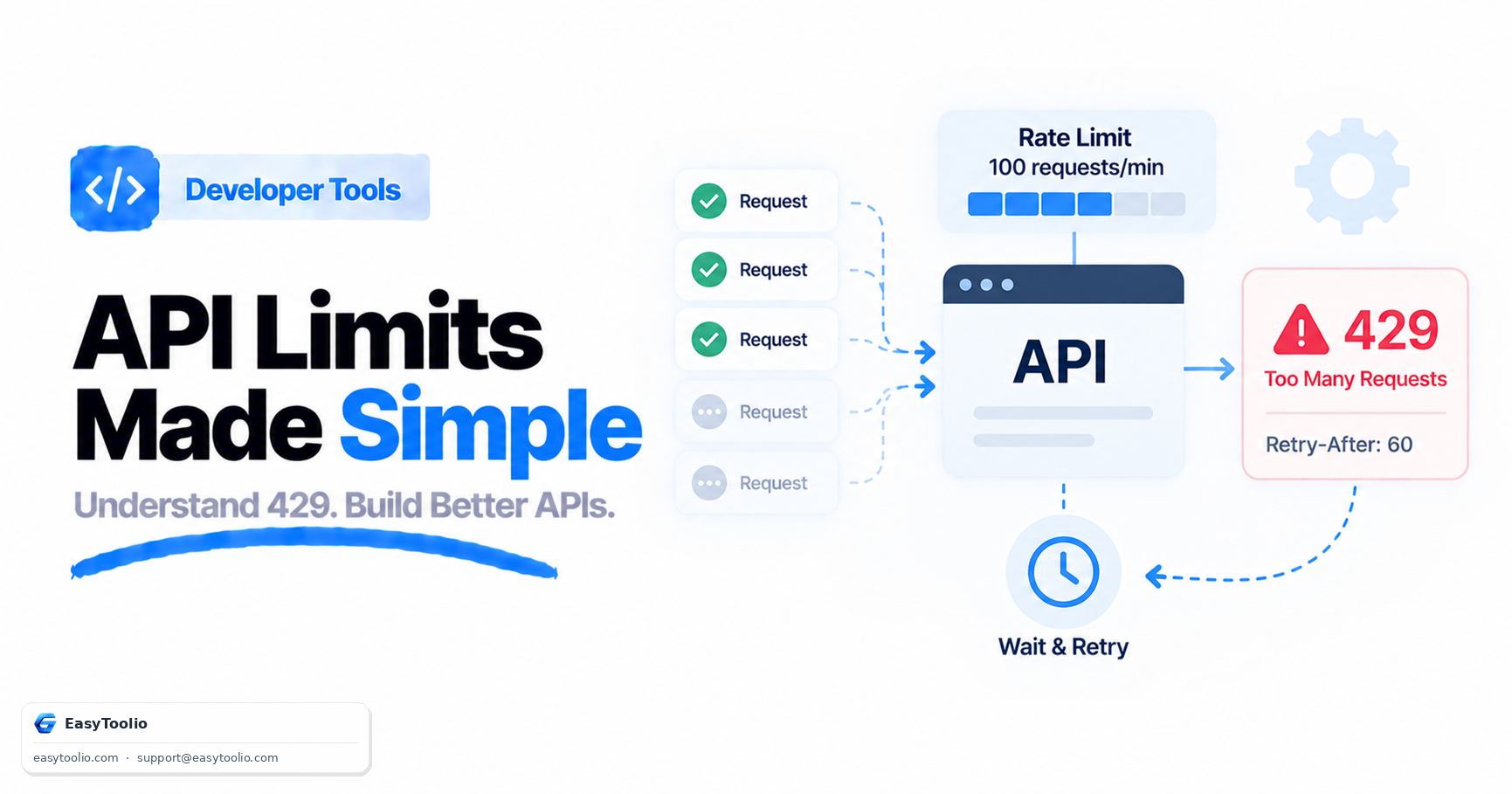
Direct Answer: Rate limiting caps how many requests a client can make in a given time window, and when that cap is exceeded the server returns HTTP status 429 Too Many Requests, often alongside a Retry-After header telling the client exactly how many seconds (or a specific timestamp) to wait before trying again. Many APIs additionally return X-RateLimit-Limit, X-RateLimit-Remaining, and X-RateLimit-Reset headers so a well-behaved client can track its own budget proactively rather than discovering the limit only by hitting it. The correct client response is exponential backoff with jitter — waiting progressively longer between retries, with some randomness added — never an immediate tight retry loop, which just amplifies the load the limiter exists to prevent.
1. Why APIs Rate-Limit in the First Place
Rate limiting serves three distinct purposes that are easy to conflate. First, infrastructure protection — a single client's runaway loop or a bug can otherwise degrade service for every other client sharing the same backend. Second, fair usage — without limits, one aggressive consumer can monopolize capacity that's meant to be shared across all API users. Third, monetization tiers — many commercial APIs use rate limits as the literal mechanism that differentiates a free tier from a paid one (100 requests/hour vs. 10,000 requests/hour on the same endpoint).
2. The Three Common Algorithms
Fixed window
The simplest approach: count requests in discrete time buckets (e.g., 00:00–00:59, 01:00–01:59) and reset the counter at each boundary. It's easy to implement but has a burst problem — a client can send the full limit right at the end of one window and the full limit again right at the start of the next, doubling the effective rate for a short period around the boundary.
Sliding window
Instead of resetting at a fixed boundary, the window continuously slides with the current time, counting requests in the trailing N seconds/minutes from now. This smooths out the boundary-burst problem of fixed windows at the cost of slightly more bookkeeping (the server needs to track request timestamps, not just a counter).
Token bucket
A bucket holds a fixed number of tokens and refills at a steady rate; each request consumes one token, and requests are rejected once the bucket is empty. This is the most common algorithm in production because it naturally allows short bursts (spending saved-up tokens) while still enforcing a steady average rate over time — it's more forgiving than a hard window while still bounding total throughput.
| Algorithm | Allows bursts? | Complexity | Common use |
|---|---|---|---|
| Fixed window | Yes, at window boundaries (unintended) | Low | Simple internal services |
| Sliding window | Minimal, smoothed | Medium | APIs needing precise enforcement |
| Token bucket | Yes, intentionally, up to bucket size | Medium | Most public/commercial APIs |
3. Reading the Response Headers
When a request is throttled, the response is a 429 status with headers that tell you exactly what to do next:
HTTP/1.1 429 Too Many Requests
Retry-After: 30
X-RateLimit-Limit: 100
X-RateLimit-Remaining: 0
X-RateLimit-Reset: 1755532800
Content-Type: application/json

{"error": "rate_limit_exceeded", "message": "Too many requests, retry after 30 seconds"}
Retry-After is the standardized header (defined for use with both 429 and 503 responses) and can be either a number of seconds or an HTTP-date. The X-RateLimit-* headers are not formally standardized but are a widely adopted convention across major APIs — X-RateLimit-Limit is the total budget per window, X-RateLimit-Remaining is what's left in the current window, and X-RateLimit-Reset is typically a Unix timestamp for when the budget refills. You can inspect exactly which of these headers a given API actually returns using an API tester or by checking the raw response with an HTTP status checker — not every API sends all four, and some use nonstandard header names entirely.
4. Client-Side Backoff: Exponential with Jitter
Retrying immediately after a 429 just resubmits into the same limit and often makes things worse, since many clients doing this simultaneously creates a "thundering herd" that re-triggers the limit the instant it clears. The standard fix is exponential backoff with jitter:
import random
import time

def request_with_backoff(make_request, max_retries=5):
    for attempt in range(max_retries):
        response = make_request()
        if response.status_code != 429:
            return response

        retry_after = response.headers.get("Retry-After")
        if retry_after:
            delay = float(retry_after)
        else:
            # Exponential backoff: 1, 2, 4, 8, 16 seconds...
            delay = (2 ** attempt)

        # Jitter: add randomness so many clients don't retry in lockstep
        delay += random.uniform(0, delay * 0.3)
        time.sleep(delay)

    raise Exception("Max retries exceeded")
The jitter matters as much as the exponential curve itself — without it, every client that got rate-limited at the same moment retries at exactly the same moment again, recreating the exact spike the limiter was trying to prevent.
Frequently Asked Questions
What's the difference between a 429 and a 503?
A 429 Too Many Requests means you specifically have exceeded a rate limit; a 503 Service Unavailable typically means the server is overloaded or down for maintenance for everyone, not just you — both can include a Retry-After header, but the underlying cause differs.
Should I retry immediately after a 429?
No — retrying immediately just resubmits into the same limiting window and can make the situation worse for you and other clients. Respect the Retry-After header if present, or use exponential backoff with jitter if it isn't.
Are X-RateLimit headers an official standard?
Not formally in the way Retry-After is — there is a newer RateLimit header field IETF draft aiming to standardize this, but in current practice most APIs use their own X-RateLimit-* convention, so always check the specific API's documentation.
Can rate limits apply per API key instead of per IP?
Yes, and most commercial APIs limit per API key or per authenticated account rather than per IP address, precisely so the limit tracks a specific customer's usage tier rather than penalizing everyone behind a shared corporate NAT.
Does hitting a rate limit mean my API key is banned?
Not usually — a 429 is a temporary, expected throttle that clears after the window resets. Repeatedly ignoring it and hammering the endpoint anyway is what can escalate to an actual ban or key revocation.
References: RFC 6585 (Additional HTTP Status Codes, defines 429), RFC 9110 (HTTP Semantics, Retry-After).